
NPC
Quick Start
@CodeBuddy in an Issue or PR comment and describe what you need — it runs and replies automatically:
@CodeBuddy help me implement this Issue
@CodeBuddy help me review the code changes in this PR
@CodeBuddy is a built-in system NPC that works out of the box.
Define your own NPC
Configure a role in your repository's .cnb/settings.yml, then use it via @repo-path(role-name):
npc:
  roles:
    - name: Expert
      prompt: |
        You refer to yourself as "Expert" and are committed to providing professional, accurate technical answers.
@<your-repo-path>(Expert) help me answer this issue.Replace <your-repo-path> with the actual repository path, e.g. your-group/your-repo. The system uses the default runtime (cnbcool/default-npc:latest) — no extra .cnb.yml or Dockerfile needed.
To further specify a runtime image, model, or inject custom prompts, see Customizing NPCs.
Understanding NPC
Once you've gotten started, this part helps you understand what an NPC really is, which types exist, and how to select one.
What Is an NPC
An NPC (Non-Player Character) is an automated role in Cloud Native Build — a virtual assistant that can reply to comments, collaborate on code, and more.
Cloud Native Build splits user actions into two categories: UI interactions you perform manually, and automated interactions performed by an NPC on your behalf. The actor for the latter is uniformly displayed as NPC, distinguishing it from real users.
When you @-mention an NPC in a comment, the platform starts a pipeline in which the NPC executes the task and replies.
Delegation Model
When an NPC acts on your behalf, it is essentially a delegation: you entrust a task to the NPC, which acts in your name within a limited scope. Cloud Native Build defines three terms for this relationship:
- Principal: The user who initiates the delegation, i.e., the operator who
@-mentions the NPC. The platform issues a temporary token for the NPC pipeline based on the principal's role. - Agent: The NPC entrusted to execute the task. It acts on the principal's behalf within a limited scope, and is displayed as the NPC identity.
- Delegated authority: The permission scope granted by the principal to the agent, subject to three constraints — time-limited (only for the current task), place-limited (only for the current repository), and permission-limited (role ceiling and narrowed scope). It automatically expires when the task ends or the pipeline is destroyed.
NPC Capabilities
NPC capabilities come in three layers, from basic to advanced:
- Auto reply: Answering questions in comments, providing code review suggestions, and other text-based replies
- Work Mode: When enabled, the NPC can autonomously write code, push code, create branches, open PRs, and revise based on review feedback — closing the loop on Issues
- Custom behaviors: Define the NPC's role persona and runtime
Two Types of NPCs
There are two types of NPCs in Cloud Native Build:
- System NPCs — built into the platform. Currently
CodeBuddy; use it via@CodeBuddy. - Custom NPCs — roles that users define in their own repositories, mentioned via
@repo-path(role-name):
@<your-repo-path>(Expert) help me answer this issue.The part after @ is the NPC repository path (e.g. your-group/your-repo), and the content inside the parentheses is the role name (e.g. Expert). Together they identify a specific NPC.
NPC Selector
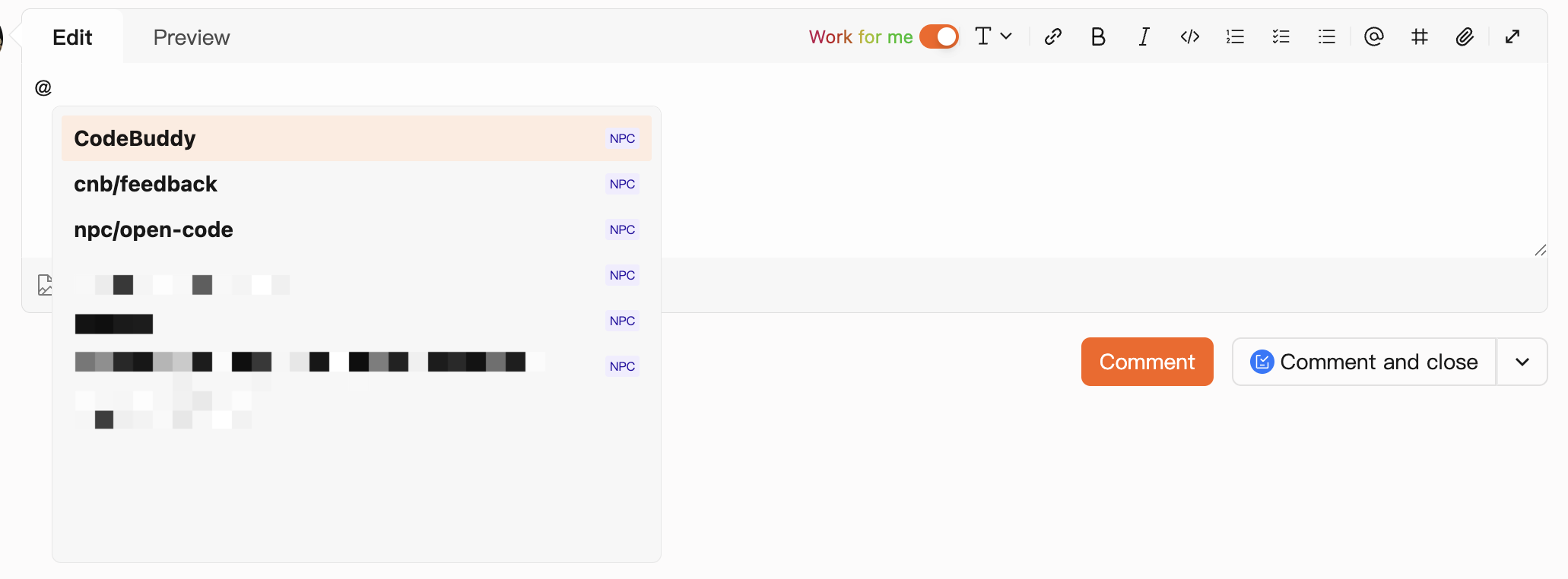
Type @ in the comment editor to open the NPC selector, which lists system NPCs, NPCs you've defined, and NPCs from repositories you follow. Just pick one to mention.
Work Mode
By default, an NPC can only read code and write comments. To let it close the development loop for you (write code, push code, open PRs), check Work for me in the comment area to enable Work Mode and grant elevated permissions.
Enabling Work Mode requires developer permission or above in the repository. Once enabled, the NPC can autonomously:
- Write code, push code, and create branches
- Create pull requests (PRs)
- Revise code based on PR review feedback
- Help resolve Issues
For detailed token permission information, see CNB_TOKEN.
NPC Events
The pipeline that gets started when you @-mention an NPC is triggered by an NPC event. This section covers what NPC events exist, how they execute, and the accompanying security restrictions.
Event Types
All NPC events are currently comment-triggered, with two types:
issue.comment@npc: Triggered when mentioning an NPC in an Issue description or commentpull_request.comment@npc: Triggered when mentioning an NPC in a PR description, review, review comment, or comment
Important
- Reopening a PR or Issue, or editing a description or comment, does not trigger the NPC event again.
- At most 10 NPC events can be triggered at one time.
- When the comment count of an Issue or PR exceeds 100, the corresponding
issue.comment/pull_request.commentand@npcevents will no longer trigger any pipeline. @mentions inside the following formats will not trigger NPC events: blockquotes, code blocks, details blocks, ordered lists, unordered lists, tables, and some HTML tags.
Event Execution
The pipeline triggered by an NPC event has a few key points:
- Where it runs: The pipeline runs in the repository where the current Issue or PR belongs (not the NPC's repository). The trigger is the current operating user (i.e., the principal in the Delegation Model).
- Which branch:
issue.comment@npc: Runs on the repository's default branchpull_request.comment@npc: Runs on the PR's target branch. For cross-repo fork PRs, if triggered by the PR author, clones code from the source repository's source branch
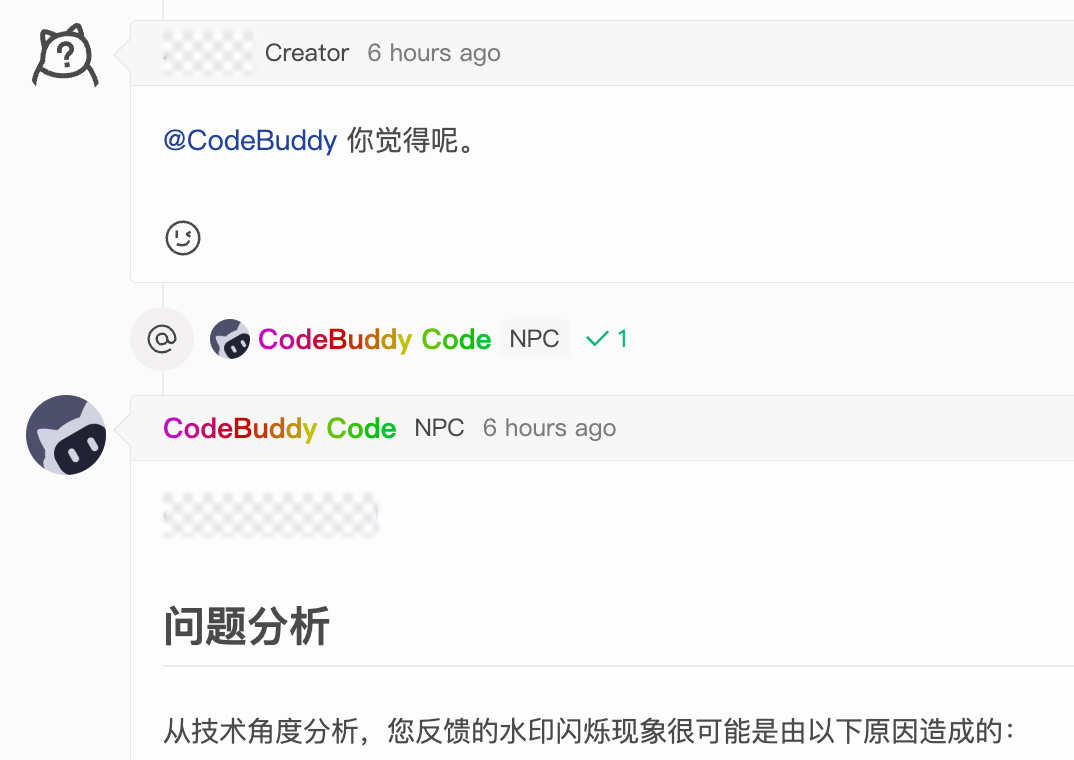
- How results appear (using commenting on an Issue as an example):
- The mentioned NPC role name and pipeline execution status are displayed below the current comment
- If the NPC replies using CNB_TOKEN, the reply author is displayed as the NPC role name
- Billing: NPC events are treated as development scenarios and consume Workspaces usage.
Security Restrictions
The following restrictions are concrete manifestations of the place-limited and permission-limited constraints in the Delegation Model:
- Repository scope:
CNB_TOKENin NPC event pipelines is limited to the current repository by default. For cross-repo fork PRs, if triggered by the PR author,CNB_TOKENis limited to public repositories only. - Role ceiling: The maximum role of
CNB_TOKENdepends on the triggering user's role in the repository:Developer/Master/Owner→ maximum roleDeveloperReporter/Guest→ maximum roleReporter, and work mode is disabled
- Secret references: If an NPC pipeline references secret repository files via
imports,settingsFrom,optionsFrom, or similar methods, the NPC will not be shareable (it will not appear in the NPC leaderboard).
Allow NPC Cross-Repo Operations
The "repository scope" in Security Restrictions is the default policy, and it can be explicitly relaxed by root-group administrators.
Once the "Allow NPC cross-repo operations" switch is enabled in the organization settings, the CNB_TOKEN access scope for NPC event pipelines expands from "the current repository" to "all repositories under the current root group". NPCs can then automatically handle cross-repo collaboration tasks (e.g., reading code across repositories, creating PRs, etc.).
Boundaries
- The switch only relaxes the place-limited constraint; it does not change the permission-limited (role ceiling) or time-limited (task / pipeline lifecycle) constraints.
- The relaxed scope is within the root group: cross-root-group access is still not allowed.
- Cross-repo fork PR scenarios (triggered by the PR author) still follow the public-repository restriction and are not affected by this switch.
Environment Variables
When an NPC event pipeline runs, in addition to the general environment variables, the platform also injects CNB_NPC_* variables — including the NPC role name, its repository, and the current Issue/PR context — for the pipeline to read and use.
For the complete variable list, see Environment Variables.
Customizing NPCs
An NPC can be customized step by step to fit your needs:
- Define role (required): In the NPC repository's
.cnb/settings.yml, configure the role name, avatar, prompt, etc. This step alone is enough to start using the NPC — the default runtime environment (cnbcool/default-npc:latest) covers the rest. - Custom behavior (optional): In the NPC repository's
.cnb.yml, define NPC event pipelines to control what the NPC does when@-mentioned. - Custom runtime environment (optional): Through
.cnb.yml+Dockerfile, build and specify the Docker image used to run the NPC.
If you have already defined a role in Quick Start, you can start directly from step 2.
Suggestion
After each step, verify the effect by @-mentioning the NPC in an Issue comment before continuing — it's easier to troubleshoot than configuring everything at once.
Define NPC Roles
Define one or more roles in your repository's .cnb/settings.yml under the npc.roles list:
npc:
  roles:
    - name: Expert
      slogan: Professional answers, efficient assistance
      prompt: |
        You refer to yourself as "Expert" and are committed to providing professional, accurate technical answers.
        Keep your responses concise and professional, citing reliable sources.
Whether in casual conversation or explaining concepts, you maintain the above style.name: The role name, used when@-mentioning (e.g.,@your-group/your-repo(Expert))slogan: The role slogan, shown on NPC cards and the NPC leaderboardprompt: The system prompt for the NPC — defines its persona and reply style
For more options (avatar, etc.), see UI Customization Configuration File.
Custom NPC Behaviors
Once a role is defined, the NPC already has a default response behavior (the default image plus the npc:go built-in task, executing tasks and replying to comments). If this default is enough, you can skip this section.
Common scenarios for customization: using your own NPC image, preparing the runtime environment in the pipeline (e.g., loading Skills, preinstalling programming languages, adding various CLI tools), or differentiating response flows by role.
How: in the NPC repository's .cnb.yml, place the NPC event pipeline under $ (applies to all roles) or under a role name (applies only to that role).
Minimal Example
Customize only the issue.comment@npc event pipeline:
$:
  issue.comment@npc:
    - docker:
        image: cnbcool/default-npc:latest
      stages:
        - name: npc go
          type: npc:go
Image Note
The minimal example uses cnbcool/default-npc:latest as the runtime environment. If you have built and pushed a custom NPC image, you can reference it using:
image: ${CNB_DOCKER_REGISTRY}/${CNB_NPC_SLUG_LOWERCASE}:latestConfiguration Merging
When an NPC event is triggered, the system automatically merges the system default config and the NPC repository's .cnb.yml via include.
The merge follows standard include semantics: event configurations defined in the NPC repository override the defaults, while undefined events retain the default behavior.
Using the minimal example above, the effective merged configuration is:
$:
  issue.comment@npc: # ← from NPC repository (overrides default)
    - docker:
        image: cnbcool/default-npc:latest
      stages:
        - name: npc go
          type: npc:go

  pull_request.comment@npc: # ← from system default (NPC repo didn't define this)
    default:
      docker:
        image: cnbcool/default-npc:latest
      stages:
        - name: npc go
          type: npc:go
Note
Merging is performed per event independently. If the NPC's repository only configures issue.comment@npc but not pull_request.comment@npc, Issue comments will run the custom pipeline while PR comments will still use the system default behavior.
To fully customize all NPC events, make sure to configure both issue.comment@npc and pull_request.comment@npc.
Full Example
Compared with the minimal example, this full example uses a custom NPC image you build and push yourself (referenced via ${CNB_DOCKER_REGISTRY}/${CNB_NPC_SLUG_LOWERCASE}:latest), and includes the image build pipeline in the same .cnb.yml.
NPC event pipeline (defines what happens when the NPC is @-mentioned):
$:
  issue.comment@npc:
    - docker:
        image: ${CNB_DOCKER_REGISTRY}/${CNB_NPC_SLUG_LOWERCASE}:latest
      stages:
        - name: npc go
          type: npc:go

  # Both events share the same config; configure as needed
  pull_request.comment@npc:
    - docker:
        image: ${CNB_DOCKER_REGISTRY}/${CNB_NPC_SLUG_LOWERCASE}:latest
      stages:
        - name: npc go
          type: npc:go
Docker image build pipeline (on push events, builds and pushes the image to the artifact registry so the NPC event pipeline above can reference it):
main:
  push:
    - services:
        - docker
      stages:
        - name: build
          script: docker build -t ${CNB_DOCKER_REGISTRY}/${CNB_REPO_SLUG_LOWERCASE}:latest .
        - name: push
          script: docker push ${CNB_DOCKER_REGISTRY}/${CNB_REPO_SLUG_LOWERCASE}:latest
The two parts above can be combined in the same
.cnb.ymlfile. For how to build the image itself, see Custom Runtime Environment below.
Configure by Role Name
If a repository defines multiple NPC roles and you want each to run a different pipeline, place events under the role name as a top-level key (at the same level as $). The custom pipeline is loaded only when the @-mentioned role name matches a top-level key.
If no NPC event pipeline is explicitly configured in .cnb.yml, the system uses the built-in default configuration. In the example below, the Expert role runs the custom pipeline under Expert: when @-mentioned; other roles (without any matching top-level key) fall back to the system default behavior.
# Override event pipelines only for the Expert role
Expert:
  # Issue comment and PR comment events share the same config; configure as needed
  issue.comment@npc:
    default:
      docker:
        image: cnbcool/default-npc:latest
      stages:
        - name: npc go
          type: npc:go
  pull_request.comment@npc:
    default:
      docker:
        image: cnbcool/default-npc:latest
      stages:
        - name: npc go
          type: npc:go
Merge relationship with $ configurations:
If the repository also contains a $ top-level key (i.e., a default configuration shared by all roles), the role name key is merged with the default configuration (system default + $ configurations) using the include semantics. Events under the role name override the same-named events under $; events not defined under that key still fall back to the system default behavior.
Naming Requirements
- The top-level key must exactly match
npc.roles[].namein.cnb/settings.yml(case-sensitive, character-exact match). - The top-level key must not include the
@prefix or the role name in parentheses; for example, do not use@cnb/feedback(Expert). - Different roles in the same repository can each have their own independent top-level key without interfering with each other.
Custom Runtime Environment
The npc:go task runs in the Docker container of the NPC event pipeline. You have three choices for the runtime environment (i.e., which image to use), from simplest to most involved:
- Default: No configuration needed — the system uses
cnbcool/default-npc:latest. - Specify an existing image directly: Put a ready image address in
docker.imagein.cnb.yml, skipping the build step yourself. - Build a custom image: Write a
Dockerfile, use a pipeline to build and push the image to the artifact registry, and reference it indocker.imageof the NPC event pipeline.
Note: The Dockerfile is not read or run directly by NPC — it is only used to build the image. See the Full Example above for the complete flow:
Dockerfile→ build the image onpushevents → reference the image in the NPC event pipeline.
Dockerfile Example for a Custom Image
When building a custom NPC image, the Dockerfile typically installs the Skills and CLI tools required by the NPC runtime. The example below installs the cnb-cli and skills CLIs and preinstalls the official cnb-skill:
FROM node:22-bookworm-slim

RUN apt-get update \
    && apt-get install -y --no-install-recommends ca-certificates git git-lfs curl jq ripgrep \
    && rm -rf /var/lib/apt/lists/* \
    && git lfs install \
    && npm install -g @cnbcool/cnb-cli skills \
    && npx skills add https://cnb.cool/cnb/skills/cnb-skill.git -g -y
Skills Loading Directories
Skills are automatically loaded from:
- User-level:
~/.agents/skills,~/.codebuddy/skills - Project-level:
.agents/skills,.codebuddy/skills
For Skills with the same name, project-level takes priority and overrides the user-level one.
Sharing NPCs
Once you've built a useful NPC, how do you let others use it?
How can others find your NPC? As long as the NPC's repository is public or the other user has read access, they can mention it in the comment editor with the full path @repo-path(role-name). See Two Types of NPCs above for the format.
How does the NPC show up in their selector? Once someone follows the NPC's repository, the NPCs you defined automatically appear in their @ selector — no need to memorize the path. See NPC Selector above.
More Use Cases
The scenarios so far have all been @-triggered, but at its core, an NPC is an AI-driven automated task, and @ is just one entry point among many. You can invoke NPC capabilities from any event's pipeline via the npc:go built-in task.
Example 1: Auto-Review PRs
Scenario: You don't want to @CodeBuddy for every PR review — you want an AI review to run automatically on every PR.
$:
  pull_request:
    - docker:
        image: cnbcool/default-npc:latest
      stages:
        - name: npc go
          type: npc:go
          options:
            role: Code Reviewer
            systemPrompt: You are a professional code reviewer. Please review the code changes and suggest improvements.
            userPrompt: Review the code changes in this PR and suggest improvements
Example 2: Manual Trigger Button on Web
Scenario: Put a button on the repository page. Clicking it opens a dialog for users to enter a task description and hand it off to the NPC — users don't need to write comments or understand pipelines.
$:
  web_trigger:
    - docker:
        image: cnbcool/default-npc:latest
      stages:
        - name: npc go
          type: npc:go
          options:
            role: Assistant
            systemPrompt: You are an assistant responsible for executing user-specified tasks and returning results.
            userPrompt: $userPrompt
$userPrompt reads the userPrompt input field the user fills in on the page. For how to configure the trigger button, see Manual Pipeline Trigger.
Example 3: Auto-Analyze CI Failures
Scenario: When a pipeline fails, automatically have the AI analyze the root cause, suggest a solution, and push the result to a WeCom group — far faster than manually digging through logs.
This case covers the full flow of collecting failure context → AI analysis → sending the notification. For the complete configuration and walkthrough, see AI Analysis and Notification for Failed Pipelines.
Code Write Permissions
In NPC events, code write permissions are granted by enabling Work Mode. In other events, whether the NPC can collaborate on code depends on the pipeline's CNB_TOKEN permissions — different rules apply here than in NPC events.
Triggering as an NPC via API
Beyond @ comments and other events, there's a third entry point: calling OpenAPI directly to trigger a build. When triggering an api_trigger via OpenAPI, pass npc.name=CodeBuddy and the build will be treated with NPC semantics:
- The actor is displayed as the NPC identity (not the API caller)
- The build title is generated with NPC semantics
- Billing is classified as an NPC scenario
- Token resources are scoped by NPC rules
This is not a comment-triggered event; systemPrompt / userPrompt for npc:go still come from the pipeline options, same as Example 1/2.
External System Integration
If you want to embed CNB NPC into your own platform (e.g., a customer support system or an internal console) — letting an action in your business trigger an NPC task — you can do it by triggering pipelines via API.
For the full integration guide, see External System Integration with NPC.